Home / TableMint / How-to / this guide
TableMint how-to
Save a Wikipedia table as CSV
Wikipedia articles often put reference data in HTML tables. You can download one of those tables as a CSV file from the page you are viewing, then open it in Excel, Google Sheets or another tool. TableMint can do this in the browser. It is not affiliated with Wikipedia and is not yet listed on the Chrome Web Store.
Do it with TableMint
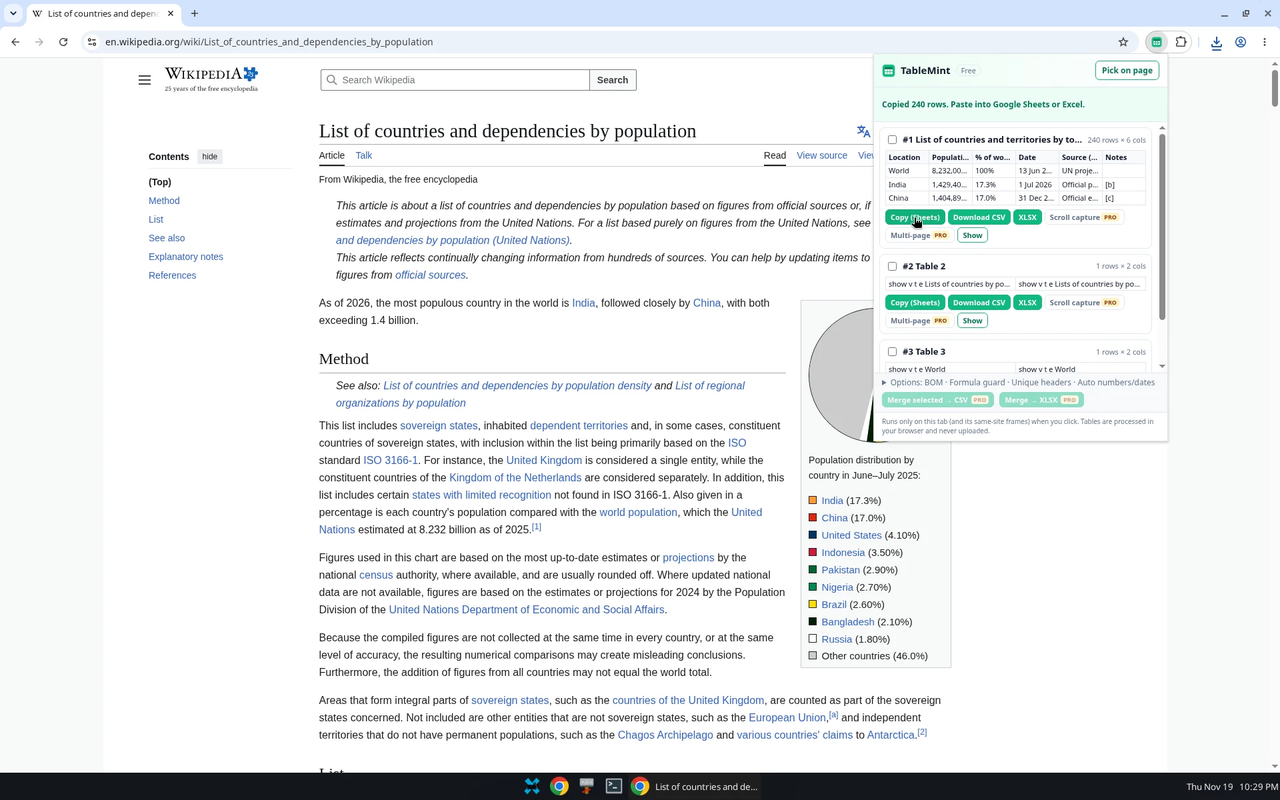
- Open the article and click the TableMint icon. On a long article, TableMint may also list small layout tables (for example a contents list). Use the row and column counts, the preview, or Pick on page to choose the real data table.
- Click Download CSV. Leave the UTF-8 BOM option on if you will open the file in Excel, so characters such as accented names stay intact.
- Open the file and check the first and last rows, and a numeric column, before you rely on it.
Things that often go wrong with wiki tables
- Flags and icons. Some cells include an image with alternative text, which can duplicate a country name or turn a number into text such as “717 Increase”. TableMint 0.2.1 is built to avoid repeating decorative alternative text. Still check rank and change columns.
- Footnotes. Reference markers such as [1] can travel with a cell. Optional cleanup that strips those markers is a Pro transform: coming soon, not on sale. In the free export you can remove them in the spreadsheet afterward.
- Merged cells. Rowspan and colspan headings are flattened so each row has a value in each column.
- Sorting. If you sorted the on-page table, the export follows what the page is currently showing.
Other ways
You can paste a Wikipedia table into a spreadsheet, or use Google Sheets IMPORTHTML on the article URL (see the Google Sheets guide). Those methods are enough for many articles. Use TableMint when you want a file from the exact table in front of you, including after you have sorted it, or when you also want a typed Excel workbook.
What is free
CSV, copy for Sheets or Excel, pick on page, and basic typed Excel (.xlsx) are free. There is no row cap on a single-table export. TableMint only runs on the tab you click it on and does not run in the background.
More guides
- Export an HTML table to Excel
- Copy a website table into Google Sheets
- Save a Wikipedia table as CSV
- Copy a table from a website into Excel
- Export ARIA and other non-table grids
Product privacy: TableMint privacy policy.