Home / TableMint / How-to / this guide
TableMint how-to
Copy a table from a website into Excel
If a website shows a table and no download button, you can still get those rows into Microsoft Excel. The reliable clipboard format is tab-separated text. TableMint can copy that for you, or download a CSV or a typed Excel workbook. TableMint is not yet listed on the Chrome Web Store.
Three free ways, same extension
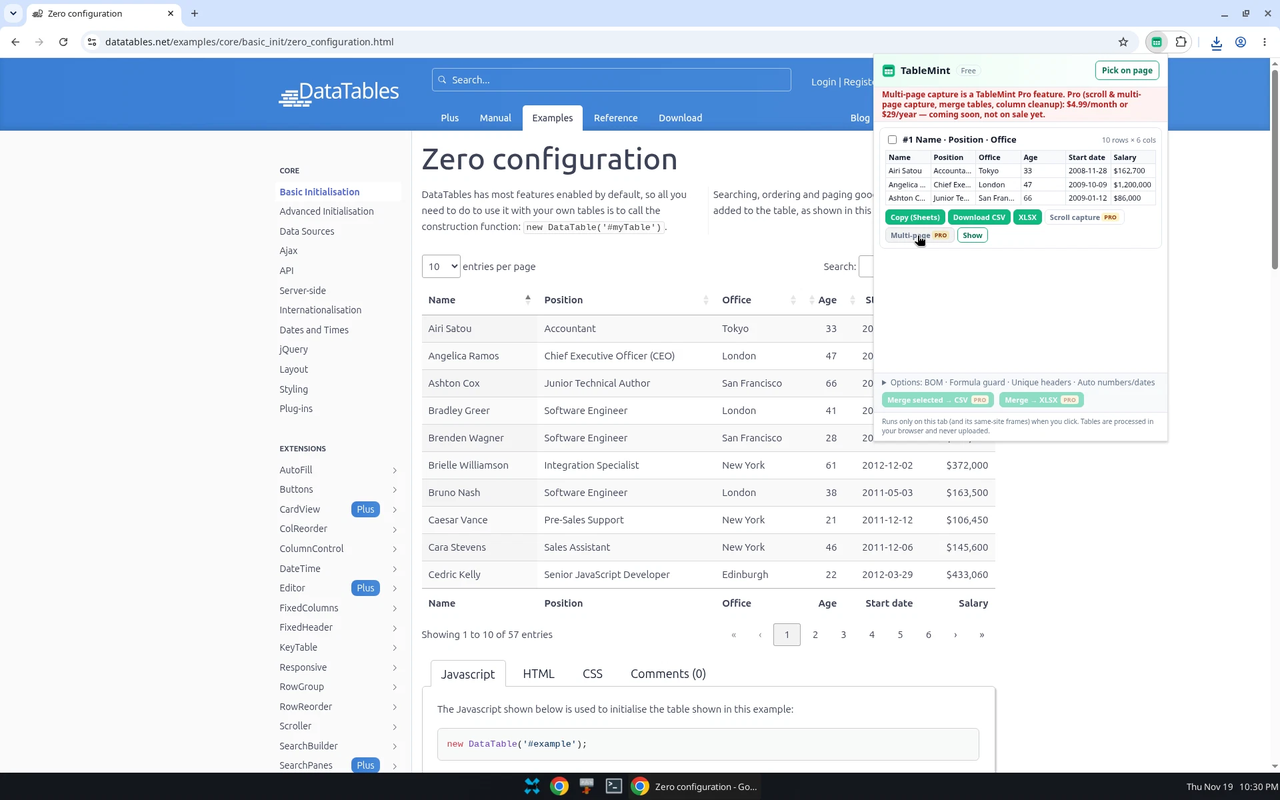
- Copy (Sheets) — copies tab-separated text. Paste into Excel; it uses the same grid as Google Sheets.
- Download CSV — a standards-compliant CSV, with an optional UTF-8 BOM so Excel shows accents correctly. The formula-injection guard (on by default) prefixes cells that start with =, +, − or @ so Excel does not treat them as formulas. You can switch the guard off under Options.
- XLSX — a basic typed Excel workbook. Numbers, currencies, percentages and dates are written as real types, not as plain text. This download is free.
Pick the table on the page
If the popup lists several tables, click Pick on page, hover until the one you want is highlighted, and click it. An on-page bar then offers Copy (Sheets) and Download CSV. More options, including the Excel download, stay in the popup.
If Excel misreads the file
- Accented characters look wrong: re-download with the UTF-8 BOM option turned on, or use the .xlsx download instead of CSV.
- A value such as 1.234,56 became a date or lost its thousands grouping: in TableMint, set Numbers to the matching format, or use Auto, then download .xlsx rather than pasting text.
- A long identifier turned into scientific notation: this is a common CSV problem in Excel. The typed .xlsx export is the better path for those columns.
What is not on sale yet
Merging several tables, cleanup tools, scroll capture and multi-page capture are TableMint Pro features. Pro is priced at $4.99/month or $29/year, is coming soon, and is not on sale. You cannot buy it in the current builds.
More guides
- Export an HTML table to Excel
- Copy a website table into Google Sheets
- Save a Wikipedia table as CSV
- Copy a table from a website into Excel
- Export ARIA and other non-table grids
Product privacy: TableMint privacy policy.