Home / TableMint / How-to / this guide
TableMint how-to
Export an HTML table to Excel
You can turn an HTML table on the page you are viewing into a real Excel workbook (.xlsx) without uploading the page anywhere. TableMint does this in your browser. TableMint is a Chrome extension and is not yet listed on the Chrome Web Store.
What “export to Excel” should mean
A useful Excel export is more than a file with an .xls or .csv suffix. Numbers should stay numbers so you can sum and sort them, dates should stay dates, and merged heading cells should not shift the columns. TableMint’s free Excel download writes a typed .xlsx workbook. CSV is also free if you would rather import the file yourself.
Do it with TableMint
- Open the page that contains the table and click the TableMint icon. TableMint only reads the tab you are on, after that click.
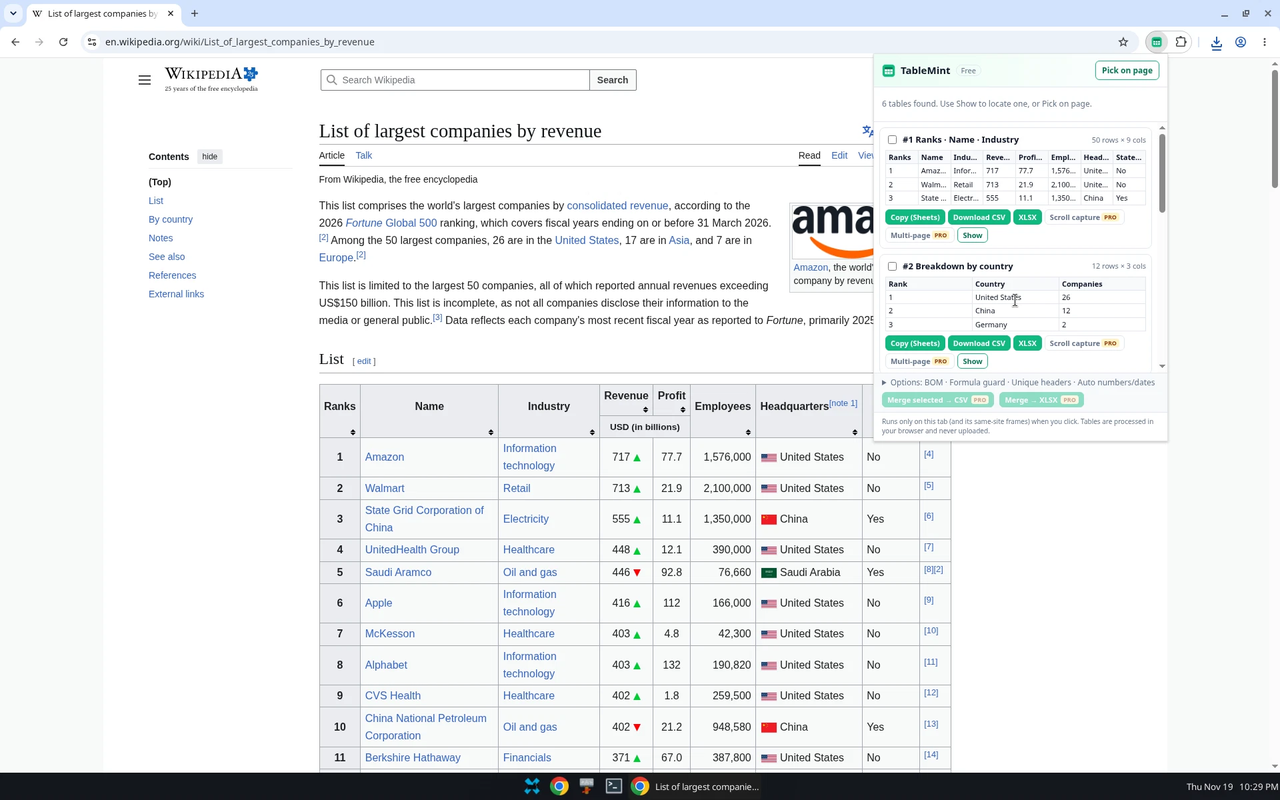
- Check the preview: row and column counts, and a few sample cells. If several tables are listed, pick the one you want. Use Show or Pick on page if the list is unclear.
- Click XLSX to download a basic Excel workbook. That download is free. You can also click Download CSV and open the CSV in Excel. Turn on the UTF-8 BOM option (it is on by default) so Excel on Windows shows accents correctly.
- If the table uses European or Indian number grouping (for example 1.234,56 or 12,34,567), leave Numbers set to Auto, or choose the format yourself under Options.
Other ways, if you do not want an extension
- Select the table in the browser, copy it, and paste into Excel. This often works for simple tables and often fails on merged heading cells or hidden rows.
- In current Excel, Data → From Web, then pick a table. This is built in, but it can miss tables that only appear after the page’s own scripts run.
What stays free, and what is not on sale yet
Free in TableMint: copy for Excel or Google Sheets, CSV, pick on page, and basic typed Excel (.xlsx). There is no row cap on a single-table export.
TableMint Pro ($4.99/month or $29/year) is coming soon and is not on sale. Planned Pro tools include scroll capture for tables that load as you scroll, combining pages you walk through yourself, merging tables, cleanup, saved templates and on-demand workflows. You cannot buy Pro today.
More guides
- Export an HTML table to Excel
- Copy a website table into Google Sheets
- Save a Wikipedia table as CSV
- Copy a table from a website into Excel
- Export ARIA and other non-table grids
Product privacy: TableMint privacy policy.