Home / TableMint / How-to / this guide
TableMint how-to
Export ARIA and other non-table grids
Many modern sites do not use an HTML <table> for data that looks like a spreadsheet. They use ARIA grids (role="grid" or role="table") or repeating div rows. A copy of the visible text, or a tool that only looks for <table>, will miss them or scramble the columns. TableMint looks for these grids on the tab you click. It is not yet listed on the Chrome Web Store.
How to tell what you are looking at
If you can highlight a “table” with the mouse but View Source (or Inspect) does not show <table>, <thead> and <td>, it is probably a grid or a div layout. TableMint labels these in the popup as ARIA grid or div table.
- Click the TableMint icon on the page that shows the grid.
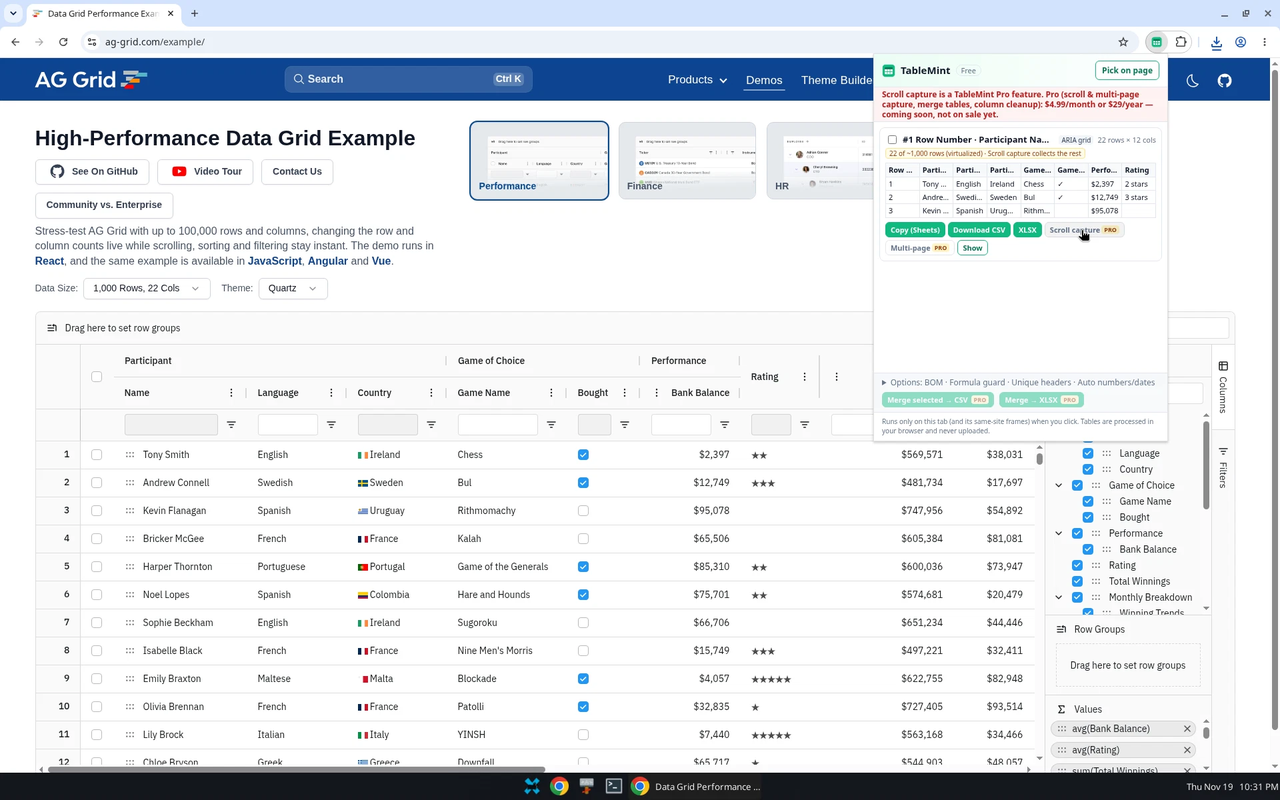
- Find the row with the ARIA grid or div-table label and check the preview.
- Use Copy (Sheets), Download CSV, or the free XLSX download, as you would for an HTML table.
Virtualized grids
Some grids only keep the rows you can see in the document, and replace them as you scroll. An export can only include rows the page has actually rendered. When TableMint can tell, it shows a warning such as “22 of ~1,000 rows (virtualized)”. Scroll capture, which scrolls the grid or the page so more rows load, is a Pro tool: coming soon, not on sale. It only scrolls; it does not click buttons or leave the page.
Limits to know about
- Frames from other sites are skipped. Same-site frames are included after you click the extension.
- Tables drawn only on a canvas, or only in an image, cannot be read as cells.
- A layout that merely looks tabular but has no repeating row structure may not be detected, or may be ranked below a real table. Use Pick on page when that happens.
What is free
Detecting ARIA grids and many div-based tables, then copying or downloading them as CSV or basic Excel, is free. There is no row cap on the rows that are actually on the page.
More guides
- Export an HTML table to Excel
- Copy a website table into Google Sheets
- Save a Wikipedia table as CSV
- Copy a table from a website into Excel
- Export ARIA and other non-table grids
Product privacy: TableMint privacy policy.